How to buy and sell crypto on Ndax: A beginner-friendly guide

Learn how to fund your Ndax account, make a first crypto purchase using Simple Trading, sell crypto for Canadian dollars, and withdraw CAD or crypto.
How to buy and sell crypto on Ndax: A beginner-friendly guide

Key takeaways

  • New users have to create and verify an Ndax account before they can deposit funds and trade.
  • Ndax currently supports CAD deposits through Interac e-Transfer and wire transfer.
  • Ndax does not charge a fee for CAD deposits.
  • Ndax’s Simple Trading offers a simpler buy-and-sell process through market orders.
  • Ndax charges a flat 0.20% trading fee on buy and sell orders, with no volume tiers or maker/taker split.
  • Once a crypto purchase is filled, the asset is added to the user’s Ndax wallet.
  • Users can sell supported crypto back to CAD and withdraw their cash through Interac e-Transfer or EFT/direct bank deposit.
  • Users can also withdraw supported crypto to an external wallet, provided they select a compatible blockchain network and enter the correct destination information.

Introduction

Buying crypto on Ndax requires creating and verifying an account, depositing Canadian dollars or crypto, selecting the desired crypto asset to buy or sell, reviewing the order and fee, and confirming the transaction. For a first trade, Ndax’s Simple Trading interface provides a straightforward way to buy or sell crypto using a market order. Once a transaction is complete, the crypto either appears in the user’s Ndax wallet if purchased or is removed from the wallet if sold.

Before making a first trade on Ndax

Before buying or selling crypto for the first time on Ndax, users need an active and verified Ndax account.

Creating an account requires users to be at least 18 years old and provide information including their name, contact details, address, and government-issued identification. Ndax also uses phone verification and identity verification, including a selfie check.

Verification must be completed before a user can deposit funds or trade. In most cases, verification can be completed automatically. In some cases, accounts may require a manual compliance review.

Step 1: Fund your Ndax account with Canadian dollars

Once an account is verified, the next step is to deposit Canadian dollars or transfer a supported crypto asset. Ndax currently supports two CAD deposit methods, including Interac e-Transfer and wire transfers. Both methods are currently free from the Ndax side.

Interac e-Transfer deposits
Interac e-Transfer is designed for sending Canadian dollars electronically from a supported Canadian bank account.

To make an Interac deposit, users retrieve the deposit instructions from their Ndax account and send the e-Transfer using those details. A unique message code is provided and should be entered in the comment, message, or note field so the transfer can be matched to the correct Ndax account.

Interac e-Transfer deposits are typically credited within 0–30 minutes after they are sent by the bank. Ndax does not charge a deposit fee. Individual banks may apply their own sending limits.

The name on the sending bank account should also match the name registered with Ndax. A name mismatch may require manual review and, in some cases, the deposit may be rejected.

Wire transfer deposits
Wire transfers provide another way to deposit Canadian dollars into Ndax. Wire deposits are free on Ndax and typically credited to a user’s account within zero to one business days after the funds are sent. Timing depends on the financial institution’s processing schedule and bank business hours.
 

Step 2: Make a first crypto purchase with Simple Trading

For a first crypto purchase, the most straightforward place to start is Ndax’s Simple Trading interface.

If desired, Ndax’s Simple Trading is designed to reduce the number of steps involved in buying and selling crypto. It supports market orders, meaning the order attempts to execute using the best available prices in the market at the time it is placed. The basic first-purchase flow is:

  1. Log in to the verified Ndax account.
  2. Open Simple Trading.
  3. Select Buy.
  4. Choose the supported cryptocurrency.
  5. Enter the amount to purchase.
  6. Review the order details and applicable trading fee.
  7. Confirm the purchase.

Ndax currently charges a flat 0.20% trading fee on every buy and sell order, regardless of trade size, with no maker/taker split or volume-based trading tiers. The fee is shown before an order is confirmed.

What happens after you buy crypto?

Once a market buy order is filled, the acquired cryptocurrency is added to the user’s Ndax wallet. The confirmed transaction can be reviewed through the Order History or Trade History tabs.

The user can keep the crypto on Ndax as long as they wish and sell it at a later date. The user also has the option to withdraw the supported crypto to an external compatible wallet if they want to.

How to sell crypto on Ndax with Simple Trading

Selling crypto on Ndax works similarly to buying. The user selects the crypto asset they want to sell, selects Sell, enters the amount, reviews the order, and confirms it.

A market sell order attempts to execute immediately against the best available buying prices. Once the order is filled, the cash proceeds are credited to the user’s CAD balance.

Market orders prioritize execution rather than a specific execution price. If there is insufficient liquidity at the first available price, a larger order may fill across multiple price levels. A limit order allows the user to specify the maximum price they are willing to pay when buying or the minimum price they are willing to accept when selling.
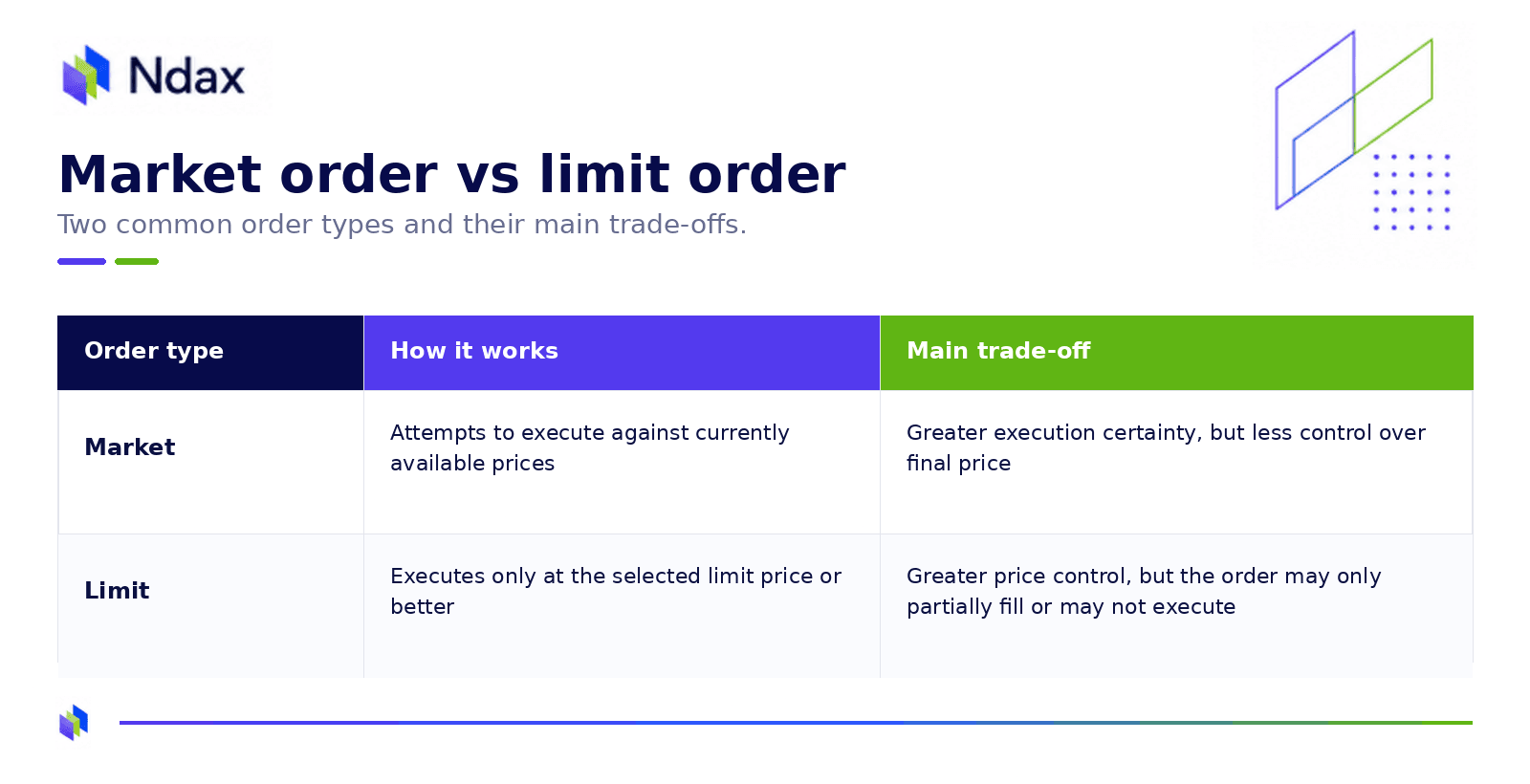
image.png

When to use Advanced Trading

Simple Trading can be useful for new users looking for a more convenient buy-and-sell process. But, users who want additional control over how their orders interact with the market can use Ndax’s Advanced Trading interface. Advanced Trading provides:

  • Real-time market data
  • An order book showing current bids and asks
  • Advanced charting and technical indicators
  • Open-order and order-history views
  • Multiple order types

Ndax’s Advanced Trading interface supports multiple order types, including market, limit, stop, stop-limit and trailing-stop orders. Ndax also offers additional advanced functionality, including fill-or-kill orders.

How to send crypto from Ndax to an external wallet

Crypto withdrawals are made from the Wallet section. The general process is:

  1. Open Wallet and select the crypto asset.
  2. Select Send.
  3. Choose a supported blockchain network.
  4. Enter the destination wallet address.
  5. Enter the amount to send.
  6. Enter a destination tag or memo when required by the asset or destination.
  7. Review the withdrawal details.
  8. Enter the 2FA code.
  9. Confirm the withdrawal through the email sent to the address associated with the Ndax account.

The network selected on Ndax has to be compatible with the receiving wallet. Sending crypto to an incorrect address or through an unsupported network may result in permanent loss. A submitted blockchain withdrawal generally cannot be reversed.

Some assets also require additional information. XRP, XLM, HBAR and certain other assets may require a destination tag or memo when being sent to another platform or wallet. Users should follow the instructions for the specific asset being withdrawn.

How to withdraw Canadian dollars from Ndax

A user must first sell crypto and have Canadian dollars available in their Ndax account before withdrawing CAD to a bank. Ndax currently supports two CAD withdrawal methods. The receiving bank account must be in the user’s name and correspond with the name registered on the Ndax account.

The first is Interac e-Transfer, which costs C$1.50. Funds are typically sent within 0–30 minutes. There is a C$10,000 limit per transaction and per rolling 24-hour period.

Wire transferred is the second option and costs C$4.99. This option is commonly used for larger CAD withdrawals. Transfers are typically processed within one business day and there is no minimum or maximum limit. Once processed, funds are typically received within one business day, depending on the receiving financial institution.

Example: From CAD deposit to first crypto purchase

Consider someone who has created and verified an Ndax account and wants to make a first C$500 crypto purchase. They could:

  1. Deposit C$500 through Interac e-Transfer.
  2. Wait for the CAD balance to appear in the account.
  3. Open Simple Trading.
  4. Choose the crypto asset they want to purchase.
  5. Enter C$500 as the purchase amount.
  6. Review the order and trading fee.
  7. Confirm the market order.
  8. Once filled, see the purchased crypto in the Ndax wallet.

At Ndax’s current 0.20% trading fee, a C$500 trade would carry a C$1 trading commission. The final amount of crypto received depends on the actual execution price when the order fills. From there, the user can keep the crypto within the account or, if they understand the custody and network requirements, withdraw it to an external wallet.

Common first-purchase mistakes to avoid

Funding from an account with a different name
Interac deposits where the sender’s name does not match the Ndax account may require additional review and may be rejected. 

Forgetting the Interac message code
The unique message code helps Ndax match an incoming e-Transfer with the correct account. Missing or incorrect information can delay the deposit.

Assuming a market order guarantees the displayed price
Market orders prioritize execution. The final execution price depends on market conditions and available liquidity. 

Confusing CAD deposit and withdrawal methods
Ndax currently accepts CAD deposits through Interac e-Transfer and wire transfer. CAD withdrawals are available through Interac e-Transfer and EFT/direct bank deposit.

Using the wrong blockchain network
A crypto withdrawal should only be sent through a network supported by both Ndax and the destination wallet or platform. Using an incompatible network can result in lost assets. 

Skipping the final order review
Users should confirm the asset, trade amount, order type, fee, and other order details before submitting a transaction.

Bottom line

A first crypto transaction on Ndax can be broken into an easy-to-follow sequence: verify the account, deposit Canadian dollars, choose a crypto asset, review the trade, and confirm the purchase.

For a first purchase, Ndax’s Simple Trading feature provides a direct interface and currently uses market orders. Once the order fills, the crypto appears in the user’s Ndax wallet.

Users who want more control over execution can move to Advanced Trading and use additional order types and market information.

When a user wants to exit one or more of their positions, their crypto can be sold for CAD and kept on the platform for a future purchase or withdrawn back to their bank account. Supported crypto can also be sent to an external wallet, although the user must carefully verify the asset, network, destination address, and any required memo or tag.

Ndax is registered as an Investment Dealer under securities legislation in all provinces and territories of Canada and is a member of CIRO and CIPF. Ndax operates under an Order Execution Only model and does not provide investment advice or recommendations. CIPF coverage does not extend to virtual assets held in client accounts.


Don't forget to follow us on social media for more updates and join the conversation on our forums.

Disclaimer: This article is not intended to provide investment, legal, accounting, tax or any other advice and should not be relied on in that or any other regard. The information contained herein is for information purposes only and is not to be construed as an offer or solicitation for the sale or purchase of cryptocurrencies or otherwise.